Team V.R | 1.2026 | macOS, Windows | AAX*, AU, VST3 | 300 MB
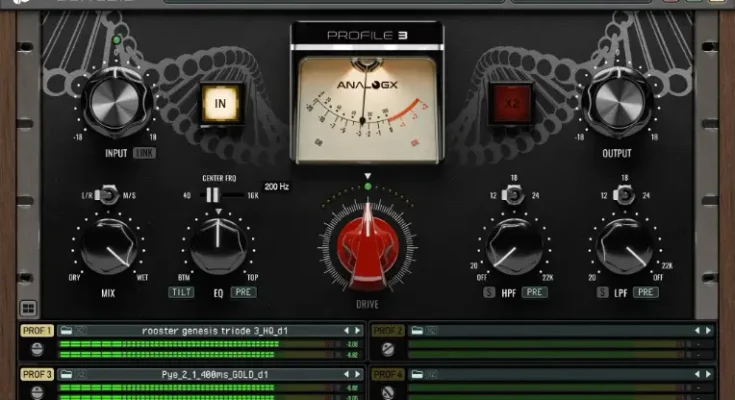
AnalogX Genesis – The Heart of Your Studio
Genesis is more than just a plugin – it’s the core of the AnalogX ecosystem.
Built to power our High-Quality Modelling Tier, Genesis delivers the warmth, depth, and non-linear behaviour of legendary studio hardware — from vintage consoles and compressors to tape machines and preamps.
With Genesis, every expansion pack becomes a new piece of gear in your DAW. Load it, dial in the tone, and bring your mixes to life with authentic analog character.
Why GPU Mixing Changes Everything
The jump to GPU isn’t just about performance, it’s about possibilities. Here’s what a GPU based Genesis Pro unlocks in your workflow.
Real-Time Neural Power
Run hundreds of AnalogX’s high-quality emulations, or NAM Profiles with minimal CPU drag per instance and super low latency.
Hybrid Workflow Freedom
Switch between CPU and GPU instances at the touch of a button, track on CPU, mix on GPU? – you choose!
Analog-Scale Mixing
Build huge SSL, Neve, and API inspired console setups, complete with tape-style summing chains instantly available right inside your DAW.
Creative CPU Headroom
Let your CPU breathe. Keep your heavy synths, reverbs, and virtual instruments running flawlessly while the GPU handles the heavy lifting.
Super-Fast Bounce Times
Render entire neural sessions much faster with full mix consistency and minimal wait time.
System Requirements
Hardware
Mac
• Apple Silicon M1 / M2 / M3 / M4 / M5 (Pro / Max / Ultra)
• Minimum 16 GB RAM (32 GB Recommended)
• macOS (13.0) or later
Note: Not compatible with ASIO Guard OFF in Cubase or Nuendo on macOS.
Windows
Supported GPUs:
NVIDIA
• RTX 2000 Series
• RTX 3000 Series
• RTX 4000 Series
• RTX 5000 Series
(Minimum 8 GB VRAM)
AMD
• RX 6000 Series
• RX 7000 Series
• RX 9000 Series
(Minimum 8 GB VRAM)
Driver Notice
Please ensure the latest official NVIDIA or AMD drivers are installed directly from the manufacturer’s website.
Drivers supplied via Windows Update are not supported.
INFO / DEMO : HOME
Please REPORT Broken Links in the Comment