TCD | 09.2025 | 667 MB
Easily create visuals that react to MIDI and audio.
Creating audio-reactive visuals has traditionally been a complex and intimidating process, often requiring deep technical knowledge and navigating software designed with steep learning curves. For many musicians and creators, this complexity becomes a barrier to exploring the visual side of performance.
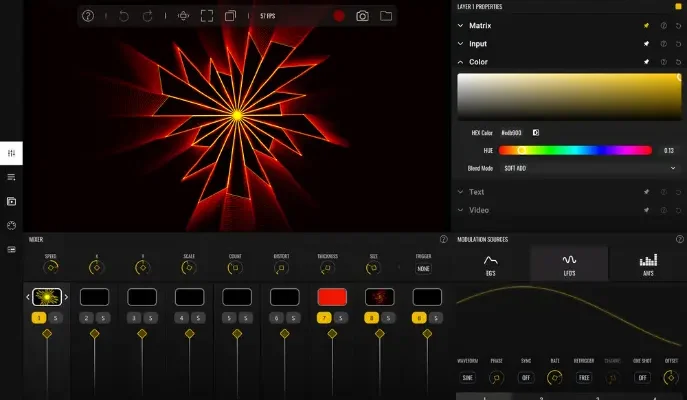
VS – Visual Synthesizer offers a refreshing solution by making the creation of music-driven visuals accessible, intuitive, and creatively inspiring. Its compact yet powerful feature set is purposefully designed with a musician’s mindset, adopting familiar concepts from audio workflows to ease the transition into the visual realm. By streamlining how MIDI and audio triggers are assigned to control visual parameters and movement, VS removes the technical friction, empowering users to focus on creativity and expression rather than setup and configuration.
Features
8 Polyphonic visual layers with blend modes
4 voices per layer
Multiple layer sources: shaders, audio visualizers, image, video, and text
Real-time input sources: camera, Syphon / Spout, and render output feedback
1 background layer with a solid color or image / video
Factory content amounting to 57 shaders, 63 presets and over 100 images and videos
Multiple expansions with new shaders, videos, images and presets in a variety of styles
Built-in shader editor for creating your own materials
4 multi-shape LFOs with sync and MIDI trigger options
2 MIDI-triggered envelope generators
4 audio-triggered modulators with peak and frequency band modes
Modulation Matrix per layer
Built-in video recorder
Preset Playlist with duration and transition time settings
Audio & MIDI player for loading your music
Midi Mapping Manager
Media Manager
Up to 60 FPS, 4k output with horizontal and vertical portrait rendering
Syphon / Spout and NDI output
x64: SAL, VST3, VST2 | x86: JBridge
For Win10+ x64 only.
Just install.-TCD
Yes, the environment variable is necessary for plugins.
No matter how many times you add it (or reinstall with it
checked) – it can not be entered to the registry for
than once. So, it is safe to leave it checked always.
INFO / DEMO : HOME
Please REPORT Broken Links in the Comment